> ## Documentation Index
> Fetch the complete documentation index at: https://docs.skyfree.io/llms.txt
> Use this file to discover all available pages before exploring further.
# Instance Performance
> See API latency for your instance broken down by country.
**Included with every self-managed instance.** It requires the `instance:view` permission.
## What is this?
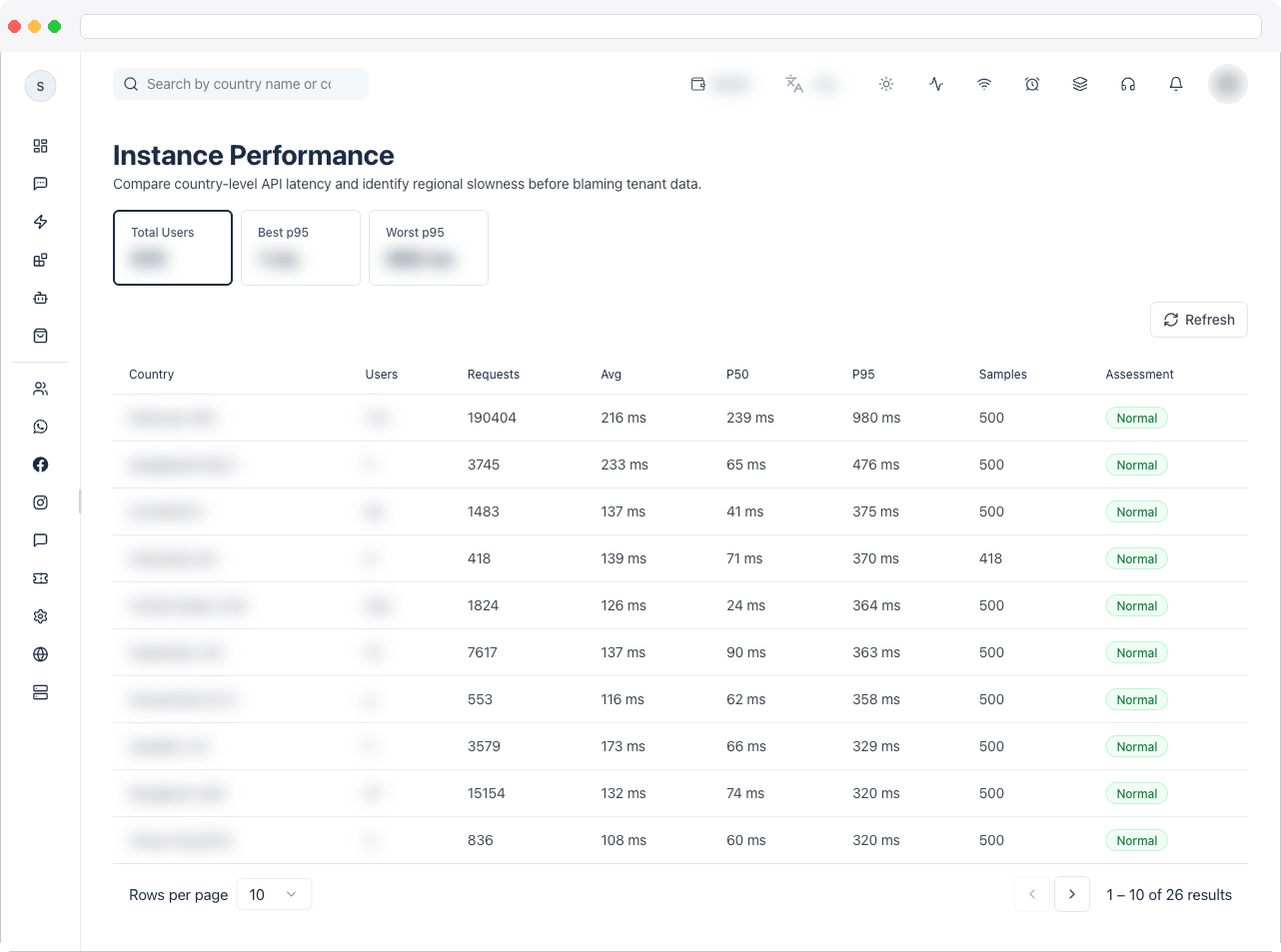
**Instance Performance** shows API latency for your instance broken down by country, so you can see how responsive your instance is for users in different regions and spot geographic performance problems.
 ## What can I do here?
* View summary tiles: **Total Users**, **Best P95** (best 95th-percentile latency among countries), and **Worst P95**
* Search countries by name or country code (for example, "Malaysia" or "MY")
* See, per country: user count, request count, average latency, P50 (median) latency, P95 latency, sample size, and an assessment (**Normal**, **Elevated**, or **Severe**)
* Refresh the data on demand (it also auto-refreshes every 30 seconds)
## How to use it
### Check latency by country
1. Open **Instance Performance**. The table lists countries sorted with the worst-performing (highest P95) first.
2. Use the search box to jump to a specific country by name or code.
3. Read the **Assessment** column: **Normal** (P95 under 1200ms), **Elevated** (1200–2500ms), or **Severe** (2500ms and above).
## What can I do here?
* View summary tiles: **Total Users**, **Best P95** (best 95th-percentile latency among countries), and **Worst P95**
* Search countries by name or country code (for example, "Malaysia" or "MY")
* See, per country: user count, request count, average latency, P50 (median) latency, P95 latency, sample size, and an assessment (**Normal**, **Elevated**, or **Severe**)
* Refresh the data on demand (it also auto-refreshes every 30 seconds)
## How to use it
### Check latency by country
1. Open **Instance Performance**. The table lists countries sorted with the worst-performing (highest P95) first.
2. Use the search box to jump to a specific country by name or code.
3. Read the **Assessment** column: **Normal** (P95 under 1200ms), **Elevated** (1200–2500ms), or **Severe** (2500ms and above).
 ### Refresh the data
1. Click **Refresh** in the toolbar to pull the latest latency samples immediately, instead of waiting for the automatic 30-second refresh.
\[NEEDS VERIFICATION] The underlying latency samples reflect API request performance measured by the instance; the exact sampling window and data retention period are not shown in the UI.
### Refresh the data
1. Click **Refresh** in the toolbar to pull the latest latency samples immediately, instead of waiting for the automatic 30-second refresh.
\[NEEDS VERIFICATION] The underlying latency samples reflect API request performance measured by the instance; the exact sampling window and data retention period are not shown in the UI.