> ## Documentation Index
> Fetch the complete documentation index at: https://docs.skyfree.io/llms.txt
> Use this file to discover all available pages before exploring further.
# Whitelabel Setup
> The control center for the infrastructure and licensing behind a self-managed instance.
## What is this?
**Whitelabel Setup** is the control center for the low-level infrastructure and licensing behind a self-managed instance — custom domain proxying, background job scheduling, instance-wide fallback services, license status, and server health.
You'll find it at **Platform → Instance → Whitelabel Setup**. It opens as a single page with six tabs across the top.
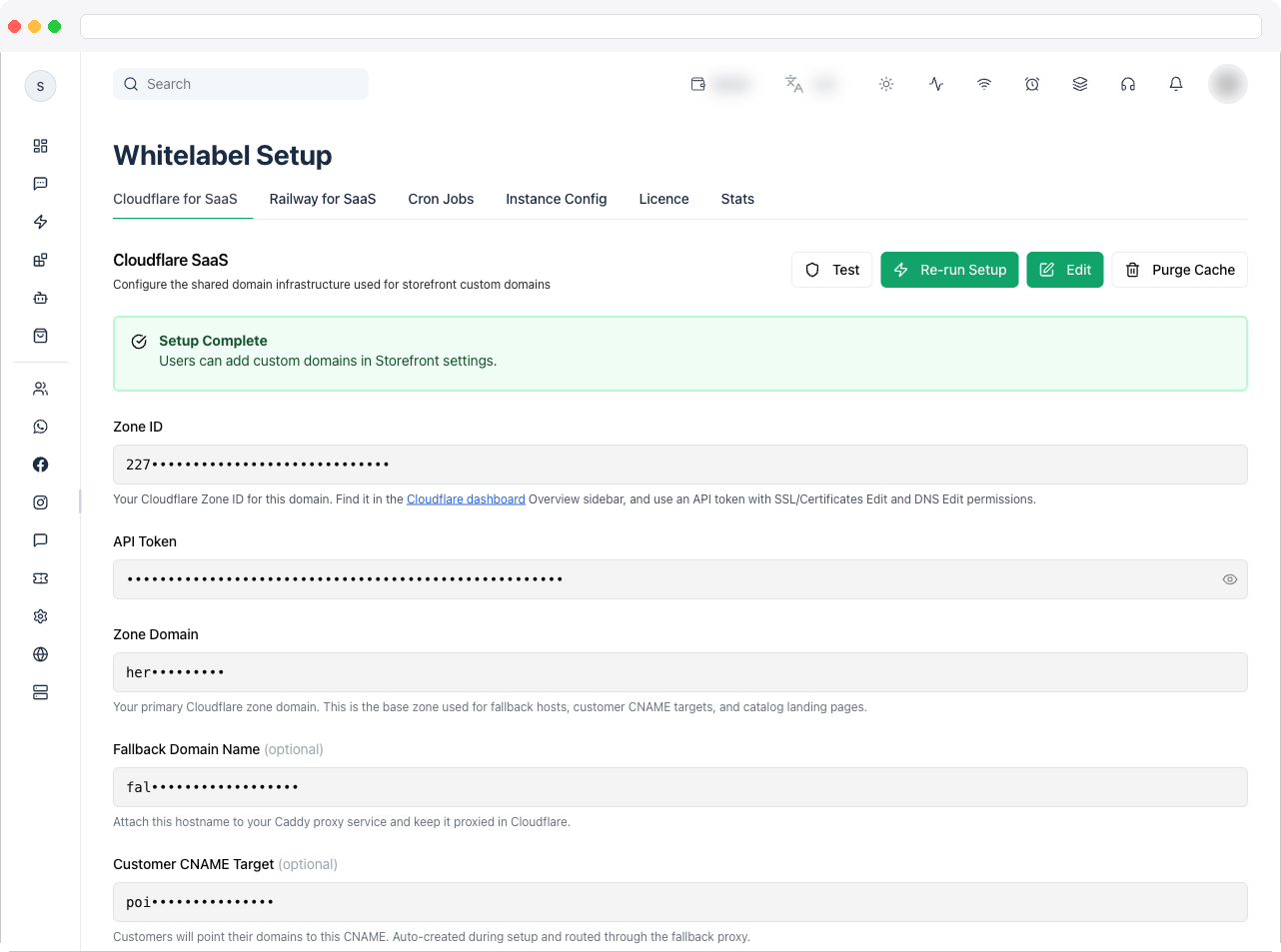 Whitelabel Setup is included with every self-managed instance and is only visible to platform owners. One tab, **Railway for SaaS**, is part of the **White-Label add-on** — see the [Self-Hosted overview](/self-host/overview).
## What can I do here?
Each tab has its own documentation page, listed in the same order as the tabs in the app:
| Tab | What it does | Requires |
| ------------------------------------------------------------------ | ------------------------------------------------------------------------------------------------------------------------------------------------------------------------------------------------- | ---------------------- |
| [Cloudflare for SaaS](/self-host/whitelabel-setup/cloudflare-saas) | Connects your Cloudflare account so customers can attach their own custom domains to their storefronts, with automatic DNS and SSL setup through a reverse proxy | Self-Hosted |
| [Railway for SaaS](/self-host/whitelabel-setup/railway-saas) | An alternate way to onboard whitelabel customer domains through Railway instead of Cloudflare | **White-Label add-on** |
| [Cron Jobs](/self-host/whitelabel-setup/cron-jobs) | Lists every background job the platform runs (campaign processing, billing, cleanup, reminders, and so on) and lets you enable or disable each one and tune its interval or schedule | Self-Hosted |
| [Instance Config](/self-host/whitelabel-setup/instance-config) | Instance-wide fallback settings not tied to a specific cron job: a fallback email sender (SES), a currency-conversion API, message-credit billing units, and read-only worker and capacity status | Self-Hosted |
| [Licence](/self-host/whitelabel-setup/licence-status) | Shows whether this instance's install license is valid and what it's licensed for, and lets you force a recheck | Self-Hosted |
| [Stats](/self-host/whitelabel-setup/stats) | A live, auto-refreshing snapshot of the server's hardware and background worker and queue health | Self-Hosted |
## How to use it
1. Go to **Platform → Instance → Whitelabel Setup**.
2. Start with **Licence** to confirm what your instance is licensed for, including whether the White-Label add-on is active.
3. Set up your domain onboarding path — **Cloudflare for SaaS**, or **Railway for SaaS** if you have the White-Label add-on.
4. Review **Cron Jobs** and **Instance Config** for background jobs and fallback services.
5. Check **Stats** regularly to keep an eye on server health.
## Troubleshooting / Technical Notes
* **The Whitelabel Setup page isn't visible.** It's only shown to platform owners on a self-managed license.
* **The Railway for SaaS tab is missing.** It's part of the White-Label add-on. Use Cloudflare for SaaS, or contact support to add the White-Label add-on.
* **A tab shows a license or permission message.** Check the **Licence** tab first.
## Related docs
* [Self-Hosted overview](/self-host/overview)
* [Whitelabel Users](/self-host/whitelabel-users)
* [Whitelabel Plans](/self-host/whitelabel-plans)
* [Platform Settings](/platform/platform-settings)
* [Instance Performance](/self-host/instance-performance)
Whitelabel Setup is included with every self-managed instance and is only visible to platform owners. One tab, **Railway for SaaS**, is part of the **White-Label add-on** — see the [Self-Hosted overview](/self-host/overview).
## What can I do here?
Each tab has its own documentation page, listed in the same order as the tabs in the app:
| Tab | What it does | Requires |
| ------------------------------------------------------------------ | ------------------------------------------------------------------------------------------------------------------------------------------------------------------------------------------------- | ---------------------- |
| [Cloudflare for SaaS](/self-host/whitelabel-setup/cloudflare-saas) | Connects your Cloudflare account so customers can attach their own custom domains to their storefronts, with automatic DNS and SSL setup through a reverse proxy | Self-Hosted |
| [Railway for SaaS](/self-host/whitelabel-setup/railway-saas) | An alternate way to onboard whitelabel customer domains through Railway instead of Cloudflare | **White-Label add-on** |
| [Cron Jobs](/self-host/whitelabel-setup/cron-jobs) | Lists every background job the platform runs (campaign processing, billing, cleanup, reminders, and so on) and lets you enable or disable each one and tune its interval or schedule | Self-Hosted |
| [Instance Config](/self-host/whitelabel-setup/instance-config) | Instance-wide fallback settings not tied to a specific cron job: a fallback email sender (SES), a currency-conversion API, message-credit billing units, and read-only worker and capacity status | Self-Hosted |
| [Licence](/self-host/whitelabel-setup/licence-status) | Shows whether this instance's install license is valid and what it's licensed for, and lets you force a recheck | Self-Hosted |
| [Stats](/self-host/whitelabel-setup/stats) | A live, auto-refreshing snapshot of the server's hardware and background worker and queue health | Self-Hosted |
## How to use it
1. Go to **Platform → Instance → Whitelabel Setup**.
2. Start with **Licence** to confirm what your instance is licensed for, including whether the White-Label add-on is active.
3. Set up your domain onboarding path — **Cloudflare for SaaS**, or **Railway for SaaS** if you have the White-Label add-on.
4. Review **Cron Jobs** and **Instance Config** for background jobs and fallback services.
5. Check **Stats** regularly to keep an eye on server health.
## Troubleshooting / Technical Notes
* **The Whitelabel Setup page isn't visible.** It's only shown to platform owners on a self-managed license.
* **The Railway for SaaS tab is missing.** It's part of the White-Label add-on. Use Cloudflare for SaaS, or contact support to add the White-Label add-on.
* **A tab shows a license or permission message.** Check the **Licence** tab first.
## Related docs
* [Self-Hosted overview](/self-host/overview)
* [Whitelabel Users](/self-host/whitelabel-users)
* [Whitelabel Plans](/self-host/whitelabel-plans)
* [Platform Settings](/platform/platform-settings)
* [Instance Performance](/self-host/instance-performance)