> ## Documentation Index
> Fetch the complete documentation index at: https://docs.skyfree.io/llms.txt
> Use this file to discover all available pages before exploring further.
# Whitelabel Users
> Manage every platform provisioned under your white-label instance.
**Requires the White-Label add-on.** This page is part of the White-Label add-on, which lets you create and sell white-label platforms to your own customers. Without the add-on, it doesn't appear in the Instance menu. See the [Self-Hosted overview](/self-host/overview) to compare the two levels, and check [Licence](/self-host/whitelabel-setup/licence-status) to see what your instance includes. It also requires the `instance:view` permission.
## What is this?
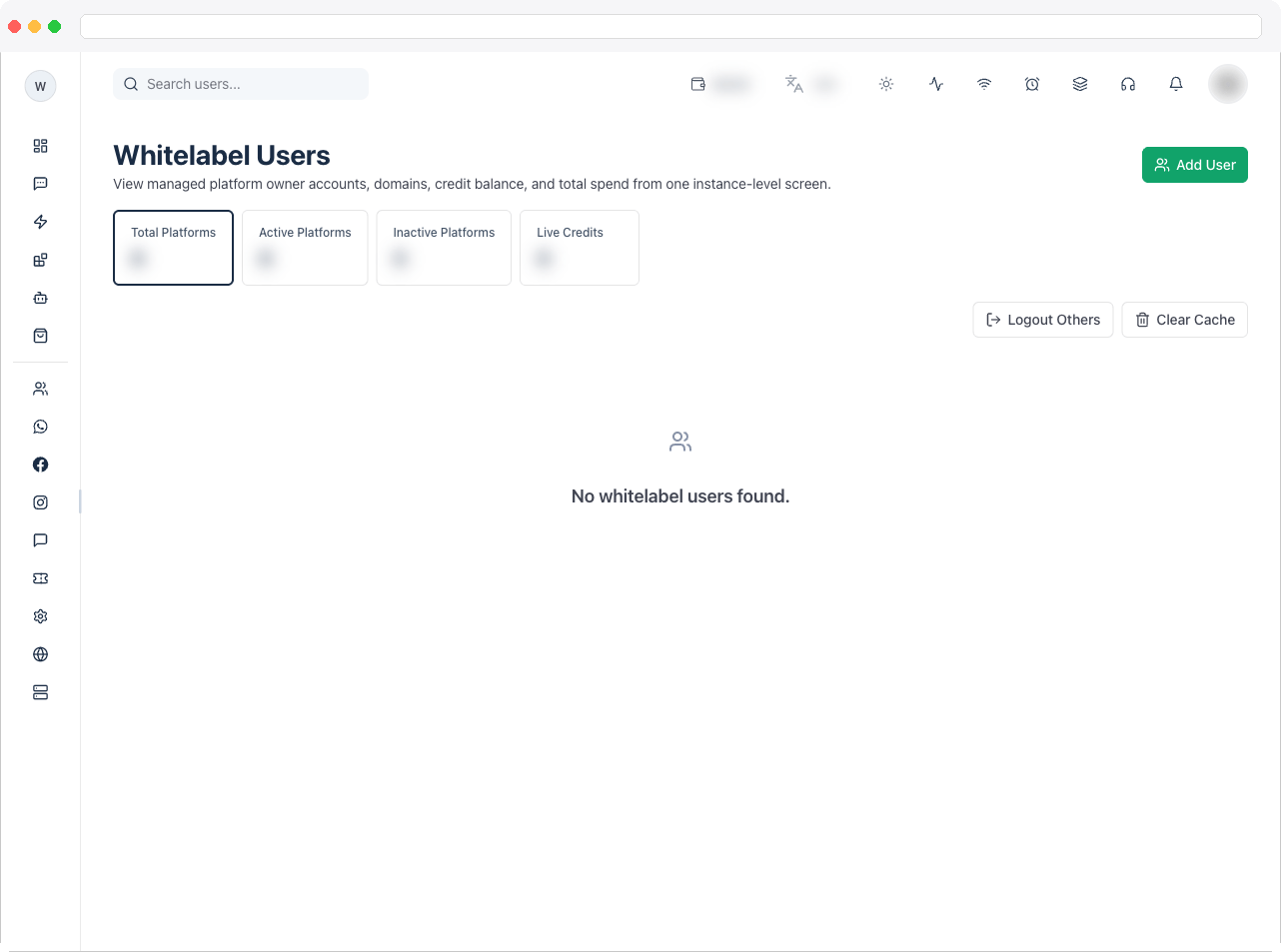
**Whitelabel Users** lists every platform (tenant) that has been provisioned under your white-label instance. Each row is one platform owner's account, with their domain, credit balance, billing mode, and total spend, plus tools to manage that account directly from your instance.
 ## What can I do here?
* View summary tiles: **Total Platforms**, **Active Platforms**, **Inactive Platforms**, and **Live Credits**
* Search platforms by keyword (debounced search box)
* For each platform, see: owner username/email/phone, platform name and domain, active/inactive status, billing mode (**Credits** or **Commission**), total amount paid, and creation date
* Open a platform's full detail view (owner info, users, transactions, and plans)
* Manually assign an **Addon Plan**, **Manual Credits**, or a **Wallet Recharge** to a platform
* Log in directly to a platform as its owner (impersonation) for support
* For platforms on the **Commission** billing mode: run the monthly settlement and refresh the billing lock status
* **Instance owner only**: manually add a new whitelabel platform (bypassing the payment gateway), log out all other admin/team sessions instance-wide, and clear in-memory server caches
## How to use it
### View a platform's details
1. Find the platform in the table (use search if the list is long).
2. Click the **eye icon** in the row's actions to open the platform's detail view, which shows owner info, connected users, transactions, and plans.
## What can I do here?
* View summary tiles: **Total Platforms**, **Active Platforms**, **Inactive Platforms**, and **Live Credits**
* Search platforms by keyword (debounced search box)
* For each platform, see: owner username/email/phone, platform name and domain, active/inactive status, billing mode (**Credits** or **Commission**), total amount paid, and creation date
* Open a platform's full detail view (owner info, users, transactions, and plans)
* Manually assign an **Addon Plan**, **Manual Credits**, or a **Wallet Recharge** to a platform
* Log in directly to a platform as its owner (impersonation) for support
* For platforms on the **Commission** billing mode: run the monthly settlement and refresh the billing lock status
* **Instance owner only**: manually add a new whitelabel platform (bypassing the payment gateway), log out all other admin/team sessions instance-wide, and clear in-memory server caches
## How to use it
### View a platform's details
1. Find the platform in the table (use search if the list is long).
2. Click the **eye icon** in the row's actions to open the platform's detail view, which shows owner info, connected users, transactions, and plans.
 ### Assign an addon, credits, or a wallet recharge
1. Click the **crown icon** on a platform's row to open the **Assign to Platform** dialog.
2. Choose a tab: **Addon Plan**, **Manual Credits**, or **Wallet Recharge**.
3. On **Addon Plan**: pick an addon plan, confirm/adjust the amount, and enter a **Manual Transaction ID**, then click **Assign Addon**.
4. On **Manual Credits**: pick a credit plan, enter a **Manual Transaction ID** and an optional note, then click **Assign Credits**.
5. On **Wallet Recharge**: pick a wallet plan, enter a **Manual Transaction ID** and an optional note, then click **Assign Wallet Recharge**.
### Assign an addon, credits, or a wallet recharge
1. Click the **crown icon** on a platform's row to open the **Assign to Platform** dialog.
2. Choose a tab: **Addon Plan**, **Manual Credits**, or **Wallet Recharge**.
3. On **Addon Plan**: pick an addon plan, confirm/adjust the amount, and enter a **Manual Transaction ID**, then click **Assign Addon**.
4. On **Manual Credits**: pick a credit plan, enter a **Manual Transaction ID** and an optional note, then click **Assign Credits**.
5. On **Wallet Recharge**: pick a wallet plan, enter a **Manual Transaction ID** and an optional note, then click **Assign Wallet Recharge**.
 ### Log in to a platform for support
1. Click the **login icon** on the platform's row.
2. A new browser tab opens, signed in as that platform's owner. (Disabled if the platform has no owner account, or if pop-ups are blocked.)
### Manage a commission-billed platform
For platforms with **Billing Mode = Commission** only, two extra icons appear on the row:
1. The **settlement icon** runs the monthly commission settlement for the previous UTC month. It is safe to re-run — already-settled periods are skipped.
2. The **shield icon** refreshes the platform's billing lock status, showing current wallet balance versus the minimum required and whether the domain would be locked.
### Add a new whitelabel platform manually (instance owner only)
1. Click **Add User** in the top-right.
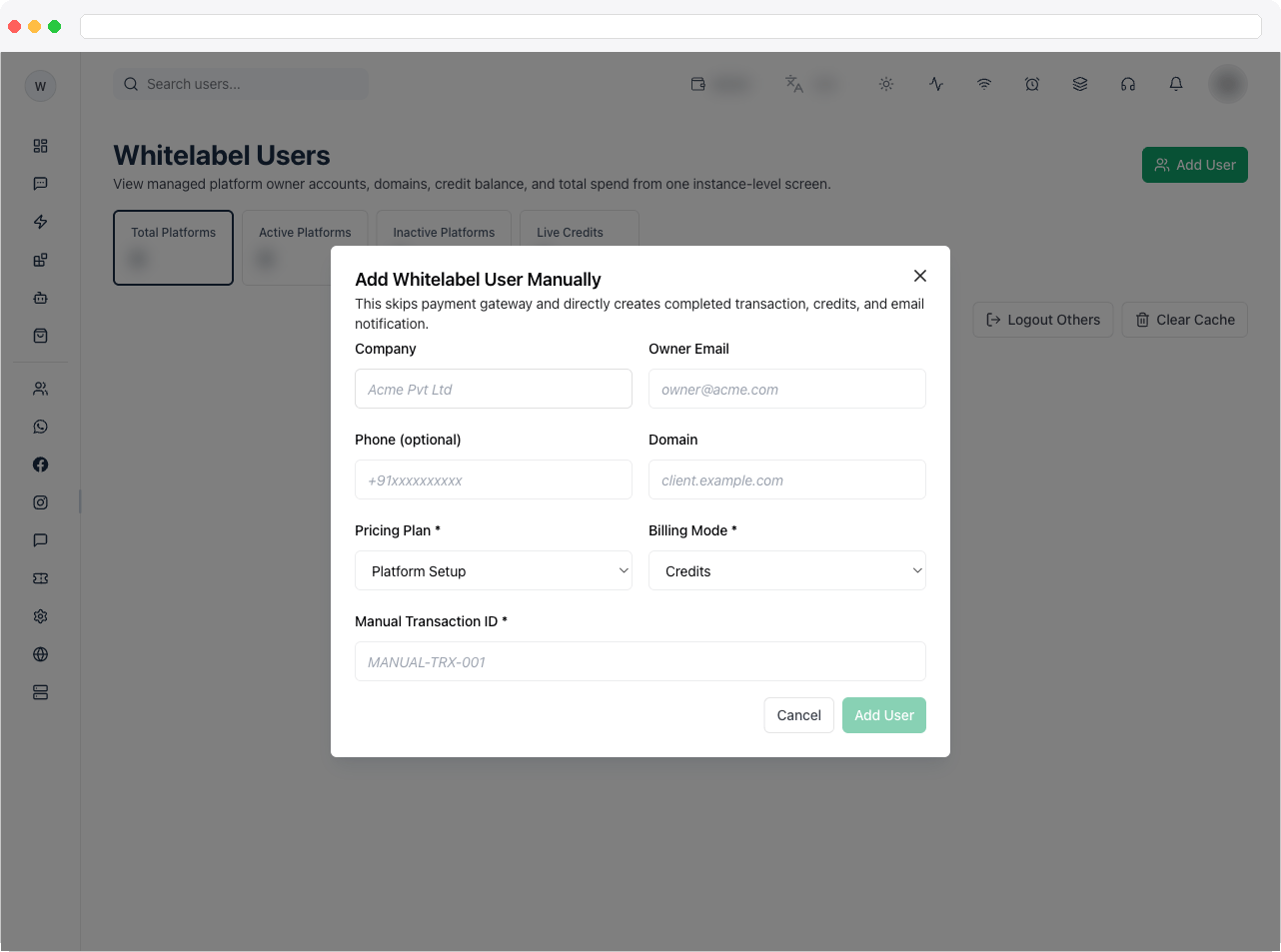
2. Fill in **Company**, **Owner Email**, **Phone** (optional), **Domain**, a **Pricing Plan** (from active setup plans), **Billing Mode** (Credits or Commission), and a **Manual Transaction ID**.
3. Click **Add User**. This skips the payment gateway and directly creates a completed transaction, assigns credits, and emails the new owner.
### Log in to a platform for support
1. Click the **login icon** on the platform's row.
2. A new browser tab opens, signed in as that platform's owner. (Disabled if the platform has no owner account, or if pop-ups are blocked.)
### Manage a commission-billed platform
For platforms with **Billing Mode = Commission** only, two extra icons appear on the row:
1. The **settlement icon** runs the monthly commission settlement for the previous UTC month. It is safe to re-run — already-settled periods are skipped.
2. The **shield icon** refreshes the platform's billing lock status, showing current wallet balance versus the minimum required and whether the domain would be locked.
### Add a new whitelabel platform manually (instance owner only)
1. Click **Add User** in the top-right.
2. Fill in **Company**, **Owner Email**, **Phone** (optional), **Domain**, a **Pricing Plan** (from active setup plans), **Billing Mode** (Credits or Commission), and a **Manual Transaction ID**.
3. Click **Add User**. This skips the payment gateway and directly creates a completed transaction, assigns credits, and emails the new owner.
 ### Instance-wide maintenance actions (instance owner only)
* **Log Out Others**: immediately signs out all active admin/team sessions across the instance (the current owner session stays active).
* **Clear Cache**: clears runtime in-memory caches without restarting the server — use only while troubleshooting instance-level issues.
## Troubleshooting / Technical Notes
* **"Add User" stays disabled.** **Company**, **Owner Email**, **Domain**, **Pricing Plan**, **Billing Mode**, and **Manual Transaction ID** must all be filled in. Fields containing only spaces count as empty. If **Pricing Plan** has no options, no active setup-category plan exists yet — see the next item.
* **The plan dropdowns in the Assign dialogs and the Add User dialog are empty.** They only list active plans of the matching category, and show "No active … plans configured" otherwise. Go to [Whitelabel Plans](/self-host/whitelabel-plans), create or re-activate a plan in the needed category, then come back.
* **The settlement and billing-lock icons are missing.** They're only shown for platforms on **Commission** billing. On a **Credits** platform they're hidden by design, and using them on any other platform shows "Not Available."
* **"Login to platform" doesn't open anything.** Your browser probably blocked the pop-up ("Popup blocked. Allow popups and try again."). Allow pop-ups for the instance domain and retry. If the platform has no owner account, you'll see "Owner missing."
* **Add User, Log Out Others, and Clear Cache aren't visible.** These are only available to the instance owner. An administrator with `instance:view` can see the page but not these actions — that's expected.
### Instance-wide maintenance actions (instance owner only)
* **Log Out Others**: immediately signs out all active admin/team sessions across the instance (the current owner session stays active).
* **Clear Cache**: clears runtime in-memory caches without restarting the server — use only while troubleshooting instance-level issues.
## Troubleshooting / Technical Notes
* **"Add User" stays disabled.** **Company**, **Owner Email**, **Domain**, **Pricing Plan**, **Billing Mode**, and **Manual Transaction ID** must all be filled in. Fields containing only spaces count as empty. If **Pricing Plan** has no options, no active setup-category plan exists yet — see the next item.
* **The plan dropdowns in the Assign dialogs and the Add User dialog are empty.** They only list active plans of the matching category, and show "No active … plans configured" otherwise. Go to [Whitelabel Plans](/self-host/whitelabel-plans), create or re-activate a plan in the needed category, then come back.
* **The settlement and billing-lock icons are missing.** They're only shown for platforms on **Commission** billing. On a **Credits** platform they're hidden by design, and using them on any other platform shows "Not Available."
* **"Login to platform" doesn't open anything.** Your browser probably blocked the pop-up ("Popup blocked. Allow popups and try again."). Allow pop-ups for the instance domain and retry. If the platform has no owner account, you'll see "Owner missing."
* **Add User, Log Out Others, and Clear Cache aren't visible.** These are only available to the instance owner. An administrator with `instance:view` can see the page but not these actions — that's expected.