> ## Documentation Index
> Fetch the complete documentation index at: https://docs.skyfree.io/llms.txt
> Use this file to discover all available pages before exploring further.
# Storefront
> Connect Meta product catalogs and run a WhatsApp storefront with products, orders, taxes, shipping, and checkout.
## What is this?
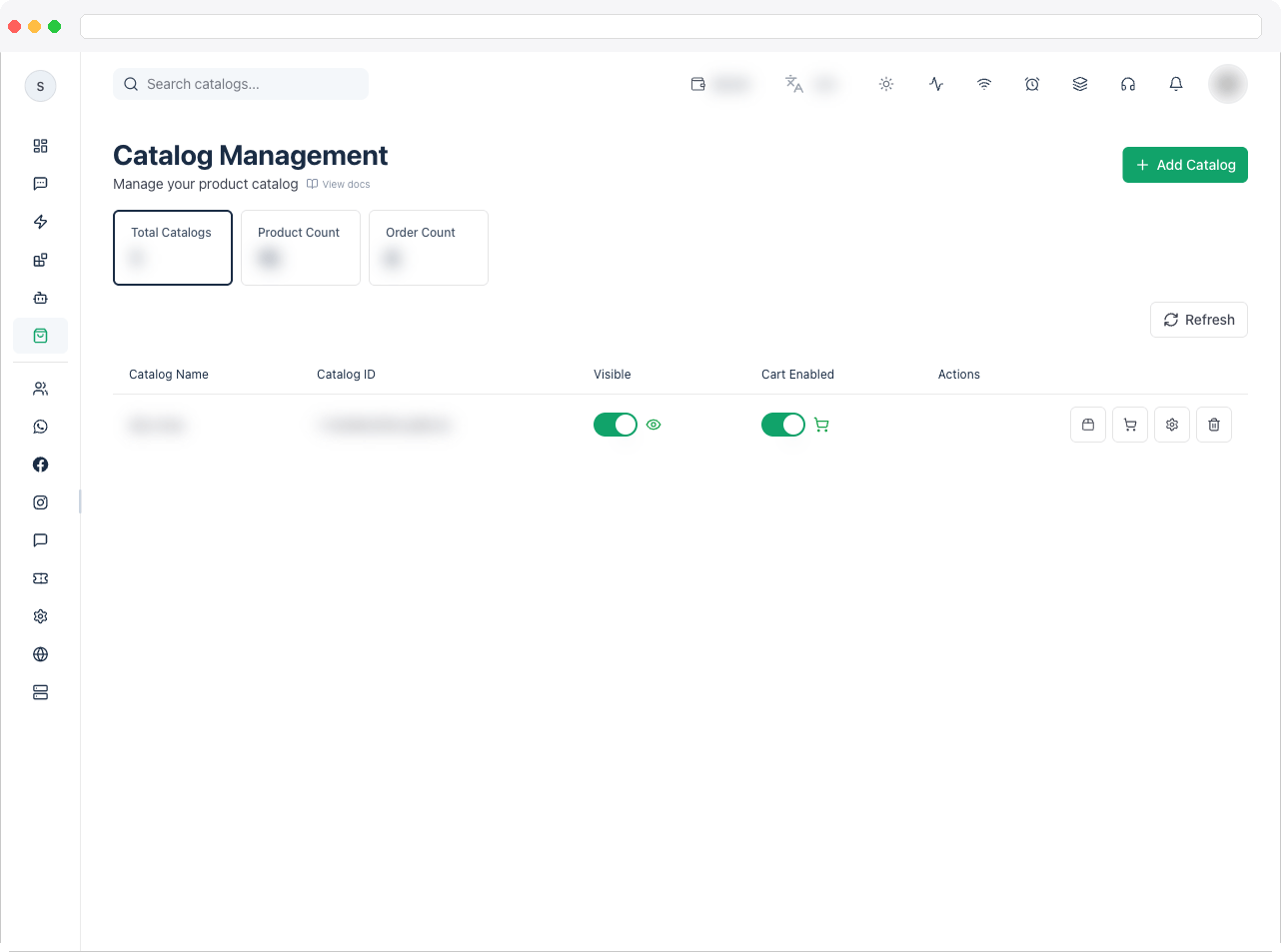
**Storefront** (the page itself is titled "Catalog Management") is where you connect your Meta product catalogs to the platform and turn them into a browsable, sellable WhatsApp storefront — with products, orders, taxes, shipping, checkout, payment gateways, a custom domain, and the storefront's own pages.
Storefront has four parts, each on its own page:
| Page | Use it to |
| --------------------------------------- | --------------------------------------------------------------------------- |
| **Overview** (this page) | Add catalogs and choose which ones customers can see and buy from |
| [Products](/workspace/catalog/products) | Create, edit, and manage the products in a catalog |
| [Orders](/workspace/catalog/orders) | Follow orders from customers and update their status |
| [Settings](/workspace/catalog/settings) | Set up tax, shipping, checkout, payments, domain, messages, and store pages |
 Storefront needs an active channel connected to WhatsApp and a plan that includes it. Your Meta Business Account must be connected so catalogs can be fetched.
## What can I do here?
* See **Total Catalogs**, **Total Products**, and **Total Orders** as tiles
* Search catalogs by name
* **Add Catalog** to fetch catalogs from your connected Meta Business Account and add one to the platform
* Per catalog, turn **Visible** (whether the catalog is shown) and **Cart Enabled** (whether customers can add items to a cart) on or off from the table
* Jump from a catalog row into **Products**, **Orders**, or **Catalog Settings**
* Delete a catalog
## How to use it
1. Go to **Storefront** in the sidebar. You'll need an active channel with WhatsApp connected.
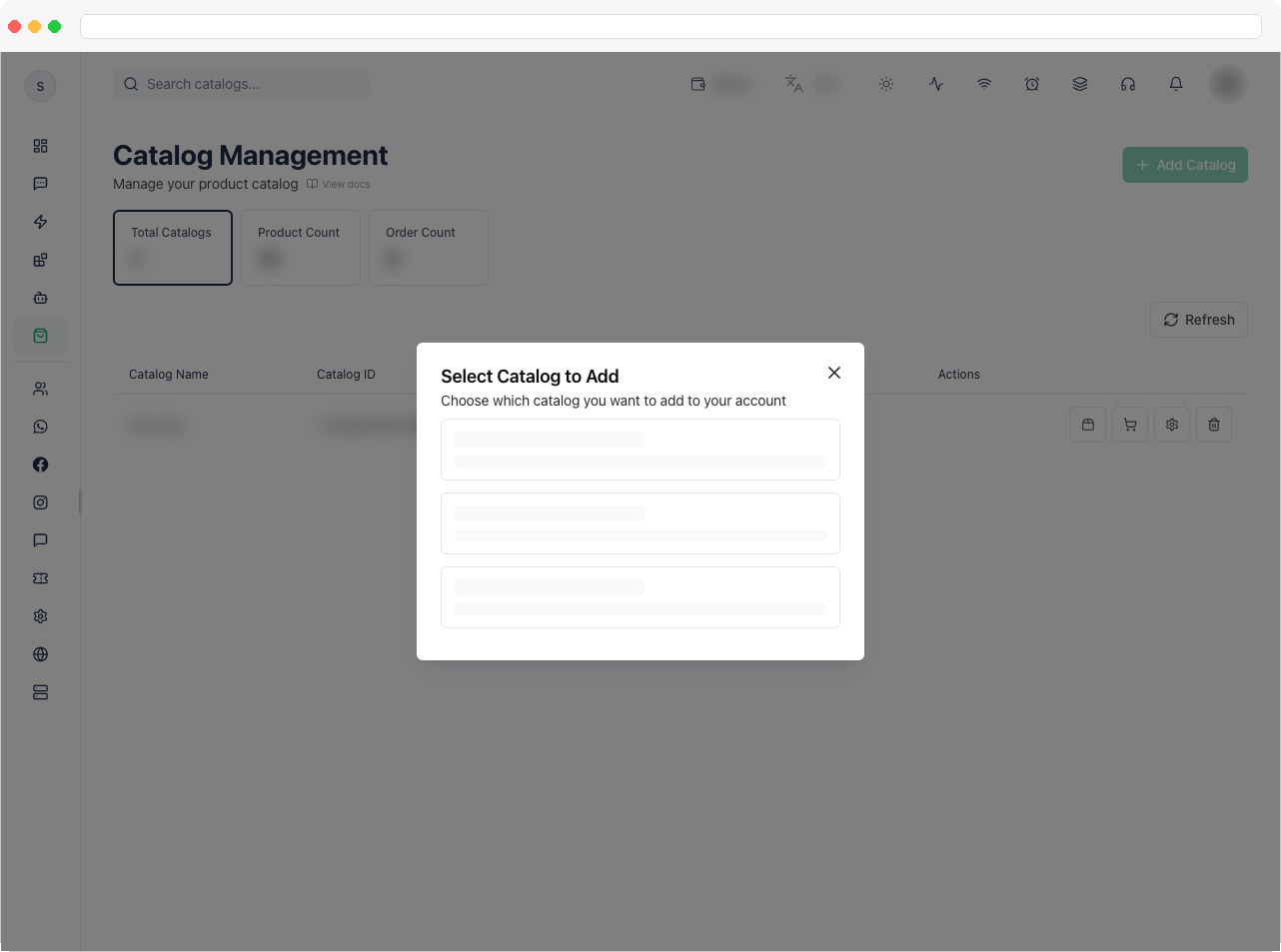
2. Click **Add Catalog**. The platform fetches the catalogs available in your connected Meta Business Account — select the one you want to add.
Storefront needs an active channel connected to WhatsApp and a plan that includes it. Your Meta Business Account must be connected so catalogs can be fetched.
## What can I do here?
* See **Total Catalogs**, **Total Products**, and **Total Orders** as tiles
* Search catalogs by name
* **Add Catalog** to fetch catalogs from your connected Meta Business Account and add one to the platform
* Per catalog, turn **Visible** (whether the catalog is shown) and **Cart Enabled** (whether customers can add items to a cart) on or off from the table
* Jump from a catalog row into **Products**, **Orders**, or **Catalog Settings**
* Delete a catalog
## How to use it
1. Go to **Storefront** in the sidebar. You'll need an active channel with WhatsApp connected.
2. Click **Add Catalog**. The platform fetches the catalogs available in your connected Meta Business Account — select the one you want to add.
 3. Once added, use the **Visible** and **Cart Enabled** switches on the catalog's row to control whether it's shown to customers and whether checkout is available.
 4. Use the row's icons to open the catalog's [Products](/workspace/catalog/products), [Orders](/workspace/catalog/orders), or [Settings](/workspace/catalog/settings).
Set up **Settings** before you go live — tax, shipping, checkout, and payment methods decide what customers see when they order.
## Troubleshooting / Technical Notes
* **"Add Catalog" shows no catalogs.** Your Meta Business Account has no catalogs available to add, or the account isn't connected. Check the connection in [Channels](/workspace/channels) and create a catalog in Meta Commerce Manager.
* **Customers can't add items to a cart.** Check that the catalog's **Cart Enabled** switch is on.
* **Customers can't see the catalog.** Check that the catalog's **Visible** switch is on.
* **The page asks you to connect WhatsApp.** Storefront needs a WhatsApp channel — see [Channels](/workspace/channels).
## Related docs
* [Products](/workspace/catalog/products)
* [Orders](/workspace/catalog/orders)
* [Settings](/workspace/catalog/settings)
* [Integrations](/workspace/integrations/overview)
* [WhatsApp overview](/workspace/whatsapp/overview)
4. Use the row's icons to open the catalog's [Products](/workspace/catalog/products), [Orders](/workspace/catalog/orders), or [Settings](/workspace/catalog/settings).
Set up **Settings** before you go live — tax, shipping, checkout, and payment methods decide what customers see when they order.
## Troubleshooting / Technical Notes
* **"Add Catalog" shows no catalogs.** Your Meta Business Account has no catalogs available to add, or the account isn't connected. Check the connection in [Channels](/workspace/channels) and create a catalog in Meta Commerce Manager.
* **Customers can't add items to a cart.** Check that the catalog's **Cart Enabled** switch is on.
* **Customers can't see the catalog.** Check that the catalog's **Visible** switch is on.
* **The page asks you to connect WhatsApp.** Storefront needs a WhatsApp channel — see [Channels](/workspace/channels).
## Related docs
* [Products](/workspace/catalog/products)
* [Orders](/workspace/catalog/orders)
* [Settings](/workspace/catalog/settings)
* [Integrations](/workspace/integrations/overview)
* [WhatsApp overview](/workspace/whatsapp/overview)