> ## Documentation Index
> Fetch the complete documentation index at: https://docs.skyfree.io/llms.txt
> Use this file to discover all available pages before exploring further.
# Conversations controls
These controls help operators quickly manage conversations without opening each chat.
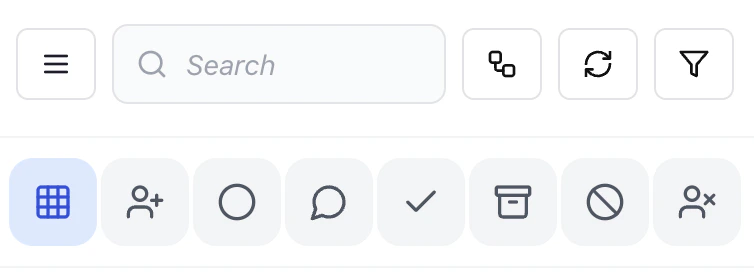 ### View all conversations
Shows the full conversation list across the current channel.
### Assign conversation
Assign the selected conversation to a team member for ownership.
### Unassigned filter
View conversations that are not assigned to anyone.\
Useful for picking up new or missed queries.
### Open conversations
Shows active conversations that require attention.
### Resolved / closed
View conversations that are completed or marked as resolved.
### Archive
Move conversations out of the active queue without deleting them.
### Block contact
Prevent a contact from sending further messages.
### Remove assignment
Unassign the conversation from the current owner.
***
### Why this matters
These controls allow fast queue management without switching screens.
* Reduces manual filtering
* Improves response speed
* Keeps team workload organized
### View all conversations
Shows the full conversation list across the current channel.
### Assign conversation
Assign the selected conversation to a team member for ownership.
### Unassigned filter
View conversations that are not assigned to anyone.\
Useful for picking up new or missed queries.
### Open conversations
Shows active conversations that require attention.
### Resolved / closed
View conversations that are completed or marked as resolved.
### Archive
Move conversations out of the active queue without deleting them.
### Block contact
Prevent a contact from sending further messages.
### Remove assignment
Unassign the conversation from the current owner.
***
### Why this matters
These controls allow fast queue management without switching screens.
* Reduces manual filtering
* Improves response speed
* Keeps team workload organized