> ## Documentation Index
> Fetch the complete documentation index at: https://docs.skyfree.io/llms.txt
> Use this file to discover all available pages before exploring further.
# Notes
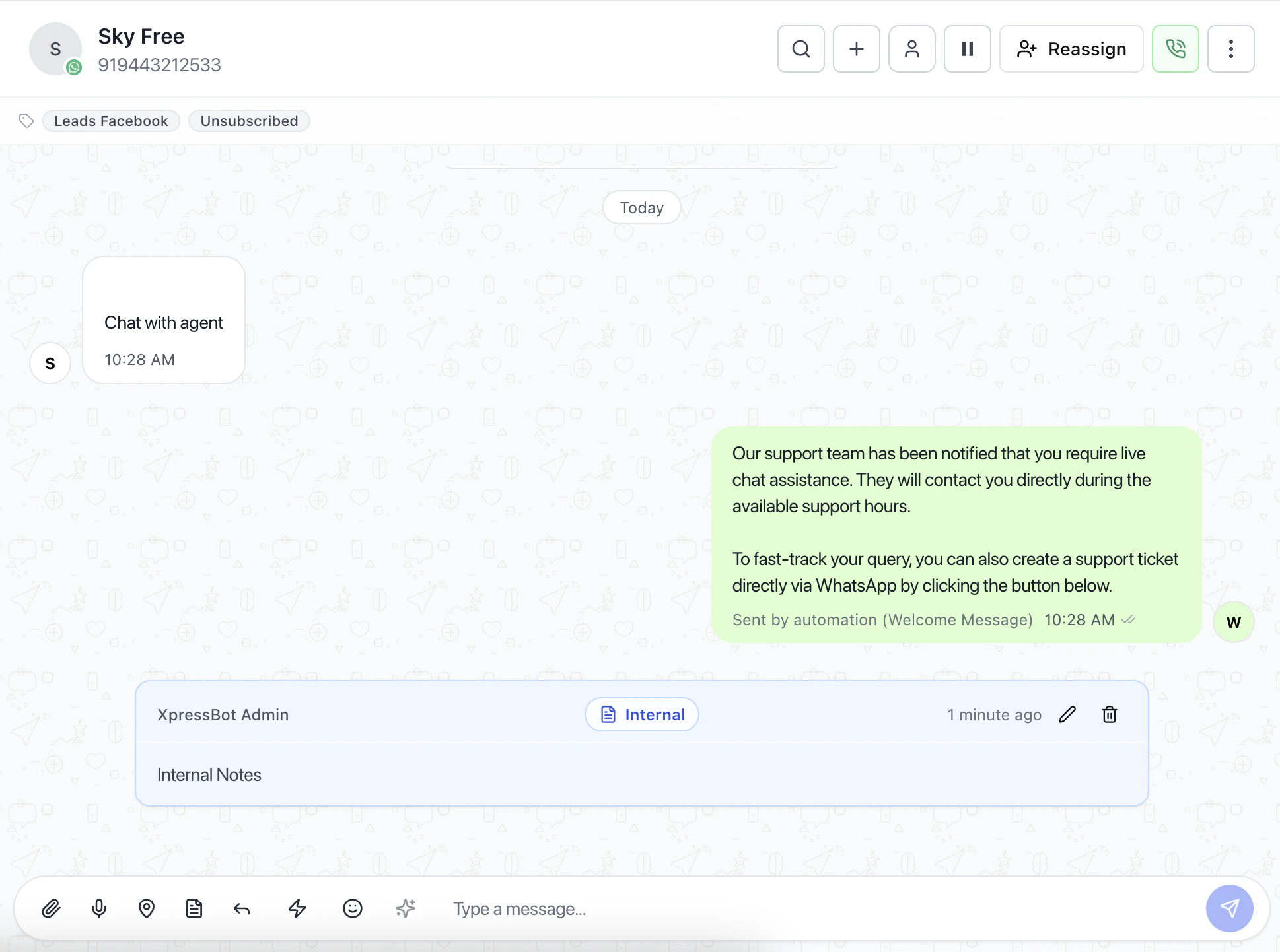
The Add Note feature allows operators to attach internal context, reminders, and alerts directly to a conversation.
This helps teams track follow-ups, important updates, and internal communication without sending messages to the customer.
 ***
## Note Types
### Internal Note
Used for private team communication.
* Visible only to team members
* Not sent to the customer
* Useful for sharing context or instructions
### Follow-up
Marks a conversation that requires action.
* Helps track pending tasks
* Useful for callbacks or pending responses
### Set Reminder
Creates a time-based alert for the conversation.
* Schedule date and time
* Triggers notification at the selected time
* Helps ensure no follow-up is missed
### Warning
Adds a high-priority alert to the conversation.
* Highlights important issues
* Useful for escalation or sensitive cases
### Info
Stores general reference information.
* Low priority
* Used for additional context or notes
***
## Reminder Scheduling
When using **Set Reminder**, you can configure:
### Date
Select when the reminder should trigger.
### Time
Choose the exact time for the alert.
### Notification behavior
* Pop-up notification
* Sound alert at scheduled time
***
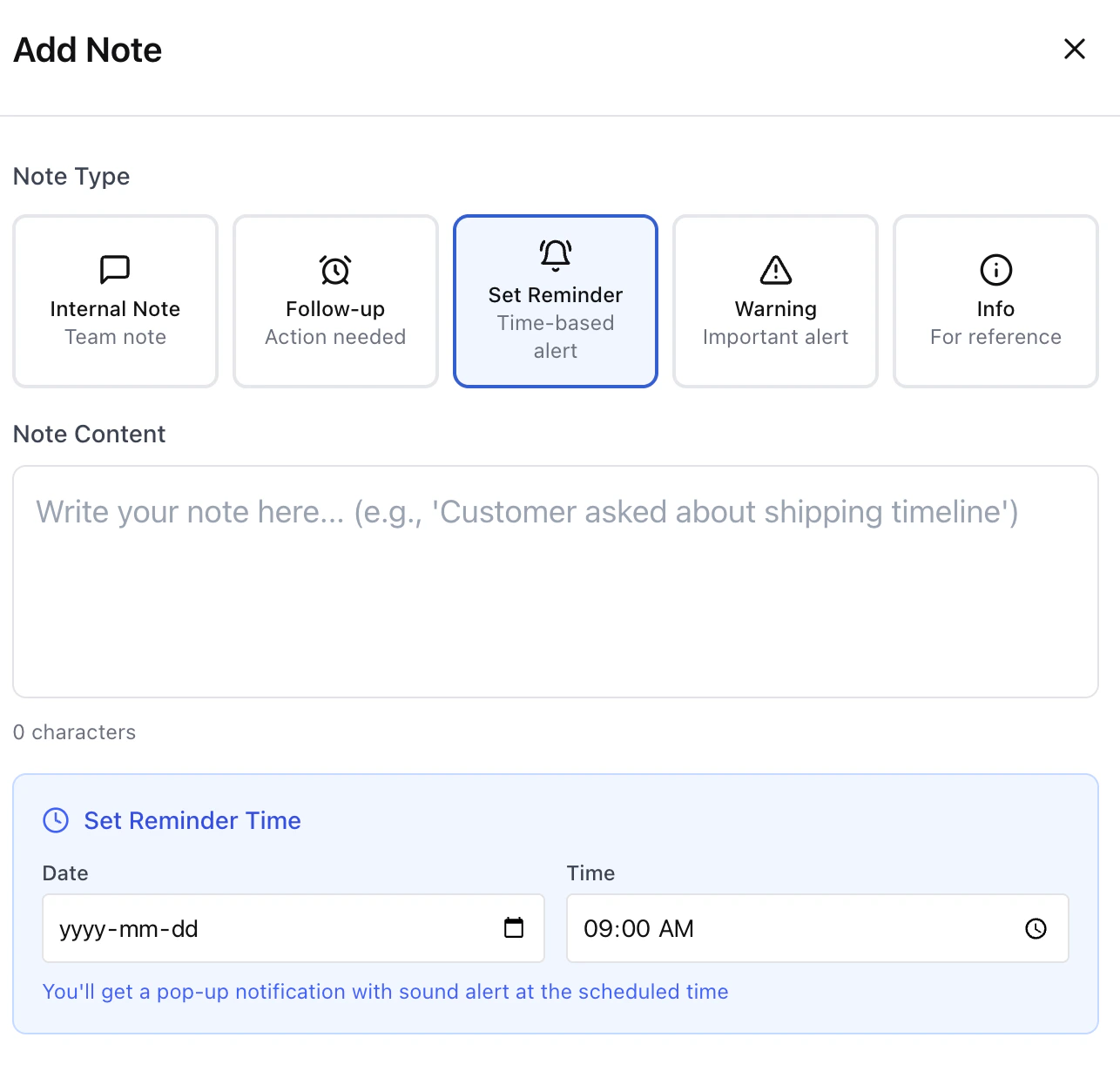
## Note Types
### Internal Note
Used for private team communication.
* Visible only to team members
* Not sent to the customer
* Useful for sharing context or instructions
### Follow-up
Marks a conversation that requires action.
* Helps track pending tasks
* Useful for callbacks or pending responses
### Set Reminder
Creates a time-based alert for the conversation.
* Schedule date and time
* Triggers notification at the selected time
* Helps ensure no follow-up is missed
### Warning
Adds a high-priority alert to the conversation.
* Highlights important issues
* Useful for escalation or sensitive cases
### Info
Stores general reference information.
* Low priority
* Used for additional context or notes
***
## Reminder Scheduling
When using **Set Reminder**, you can configure:
### Date
Select when the reminder should trigger.
### Time
Choose the exact time for the alert.
### Notification behavior
* Pop-up notification
* Sound alert at scheduled time
 ***
## Why Use Notes
Instead of relying on memory or external tools:
* Keep all context inside the conversation
* Improve team collaboration
* Track follow-ups reliably
* Reduce missed actions
***
## Recommended Usage
* Use **Internal Notes** for team communication
* Use **Follow-up** for pending tasks
* Use **Reminders** for time-based actions
* Use **Warnings** for critical conversations
***
## Best Practices
* Always add a note before handing off a conversation
* Use reminders for anything time-sensitive
* Avoid long notes — keep them focused
* Use warnings only when necessary
***
## Related Docs
* [Inbox](/docs/inbox)
* [Assign a Conversation](/docs/inbox/assign-a-conversation)
* [Manage Conversation Actions](/docs/inbox/manage-conversation-actions)
***
## Why Use Notes
Instead of relying on memory or external tools:
* Keep all context inside the conversation
* Improve team collaboration
* Track follow-ups reliably
* Reduce missed actions
***
## Recommended Usage
* Use **Internal Notes** for team communication
* Use **Follow-up** for pending tasks
* Use **Reminders** for time-based actions
* Use **Warnings** for critical conversations
***
## Best Practices
* Always add a note before handing off a conversation
* Use reminders for anything time-sensitive
* Avoid long notes — keep them focused
* Use warnings only when necessary
***
## Related Docs
* [Inbox](/docs/inbox)
* [Assign a Conversation](/docs/inbox/assign-a-conversation)
* [Manage Conversation Actions](/docs/inbox/manage-conversation-actions)