> ## Documentation Index
> Fetch the complete documentation index at: https://docs.skyfree.io/llms.txt
> Use this file to discover all available pages before exploring further.
# Overview
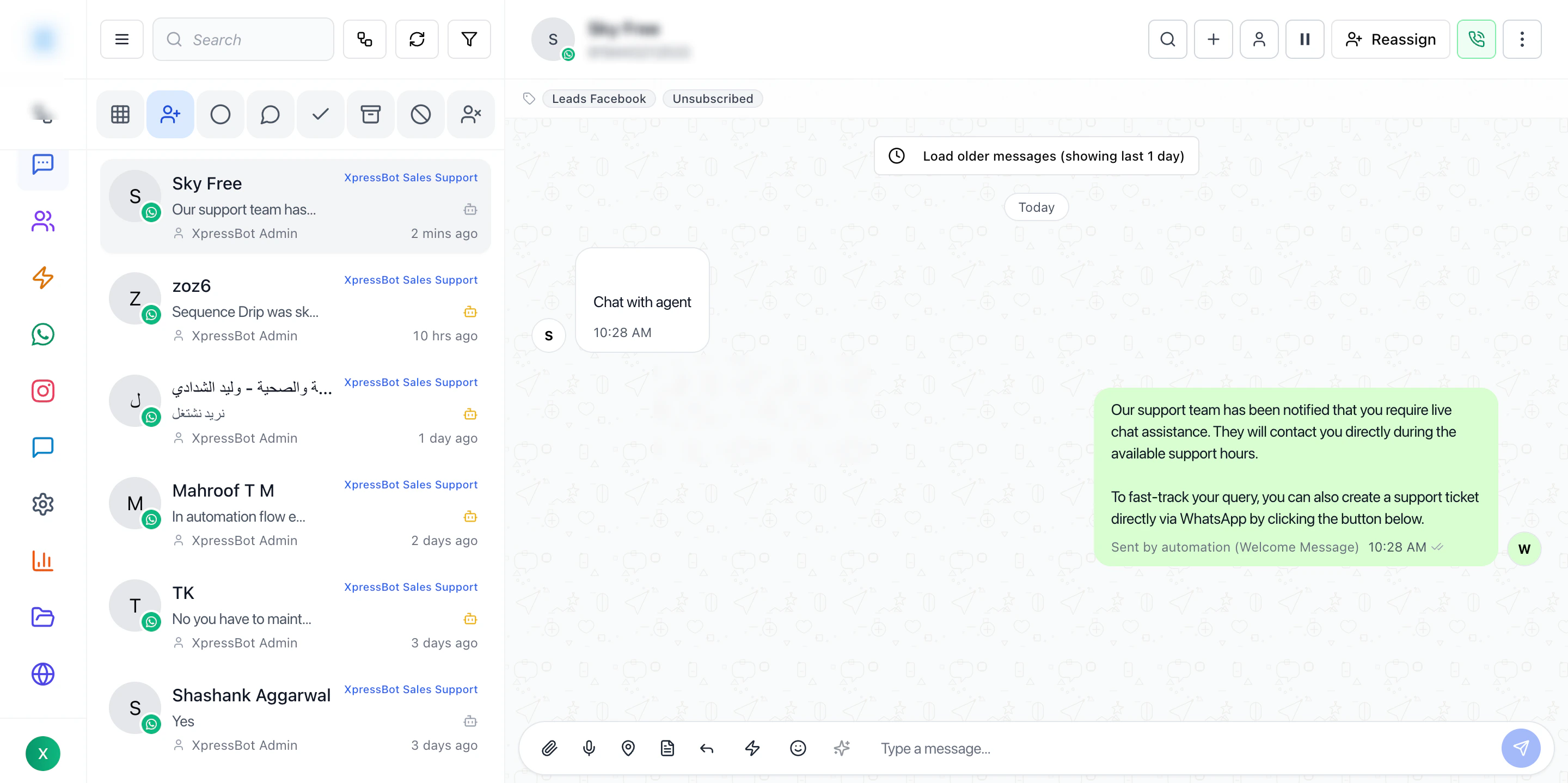
The Inbox is the live operations screen for handling conversations across all connected channels.
This is where teams move from visibility to action — selecting conversations, understanding context, and replying in real time.
 ***
## Overview
The Inbox is designed to help operators:
* View incoming messages in one place
* Manage multiple conversations efficiently
* Assign ownership to team members
* Respond quickly with full context
The Inbox workflow is structured into four main areas:
1. Conversation list
2. Filters and search
3. Active conversation view
4. Reply composer
Each part works together to reduce switching and speed up response time.
## Best Practices
* Always filter before working on busy queues
* Read recent messages before replying
* Keep conversation ownership clear
* Use templates carefully (avoid blind replies)
* Use labels for better organization
***
## Why Inbox Matters
Without Inbox:
* Conversations are scattered
* No clear ownership
* Hard to track responses
With Inbox:
* Centralized communication
* Faster response times
* Better team coordination
***
## Related Docs
* [Channels](/docs/channels)
* [Contacts](/docs/contacts)
* [Automations](/docs/automations)
* [Dashboard](/docs/dashboard)
***
## Overview
The Inbox is designed to help operators:
* View incoming messages in one place
* Manage multiple conversations efficiently
* Assign ownership to team members
* Respond quickly with full context
The Inbox workflow is structured into four main areas:
1. Conversation list
2. Filters and search
3. Active conversation view
4. Reply composer
Each part works together to reduce switching and speed up response time.
## Best Practices
* Always filter before working on busy queues
* Read recent messages before replying
* Keep conversation ownership clear
* Use templates carefully (avoid blind replies)
* Use labels for better organization
***
## Why Inbox Matters
Without Inbox:
* Conversations are scattered
* No clear ownership
* Hard to track responses
With Inbox:
* Centralized communication
* Faster response times
* Better team coordination
***
## Related Docs
* [Channels](/docs/channels)
* [Contacts](/docs/contacts)
* [Automations](/docs/automations)
* [Dashboard](/docs/dashboard)