> ## Documentation Index
> Fetch the complete documentation index at: https://docs.skyfree.io/llms.txt
> Use this file to discover all available pages before exploring further.
# Team
Team Management is used to control users, roles, and access permissions across the platform. It ensures the right people have access to the right features.
## Team Members
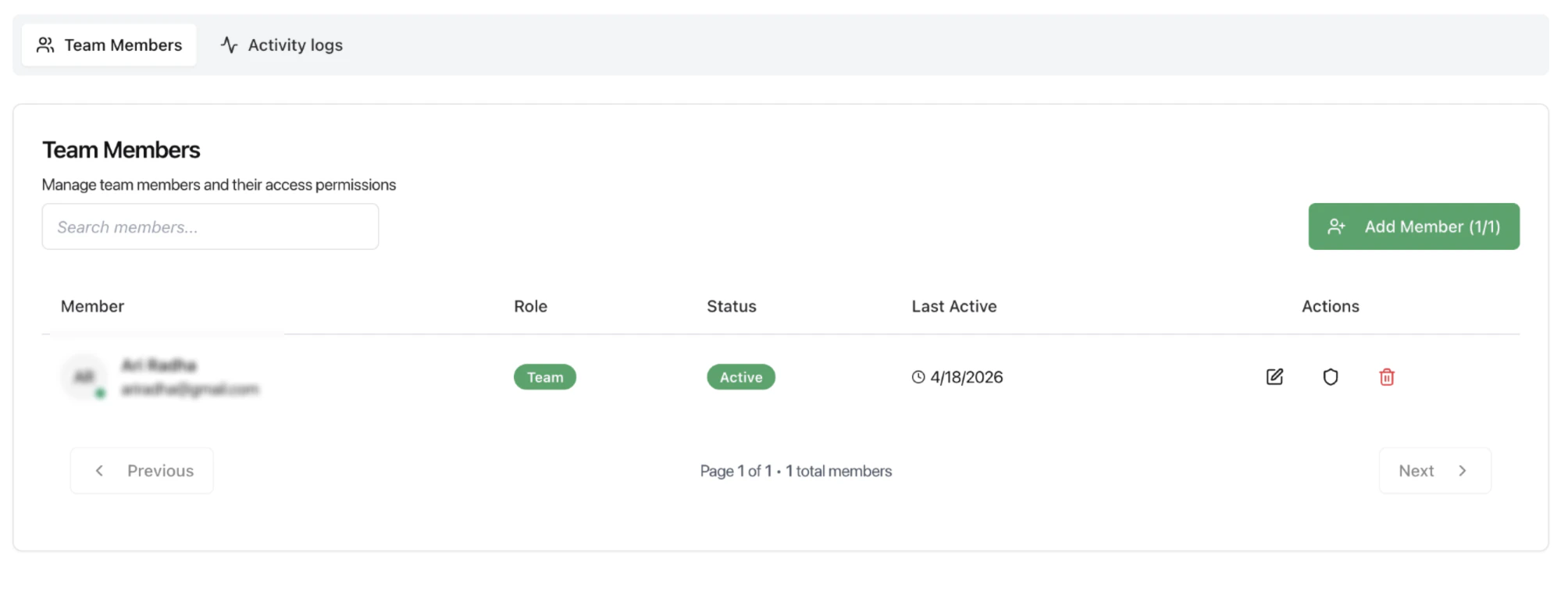
The Team Members tab shows all users added to the workspace.
### What users can do
* View all team members
* Check role and status
* See last active time
* Add new members
* Edit or remove existing members
### Key fields
* **Member** — Name and email
* **Role** — Assigned role (e.g., Team, Admin)
* **Status** — Active or inactive
* **Last Active** — Most recent activity timestamp
***
## Add / Manage Members
Users can add new members and assign roles.
 ### Actions available
* Add member (based on plan limits)
* Edit user details
* Update permissions
* Remove access
> Member limits may depend on the subscription plan.
***
## Permissions
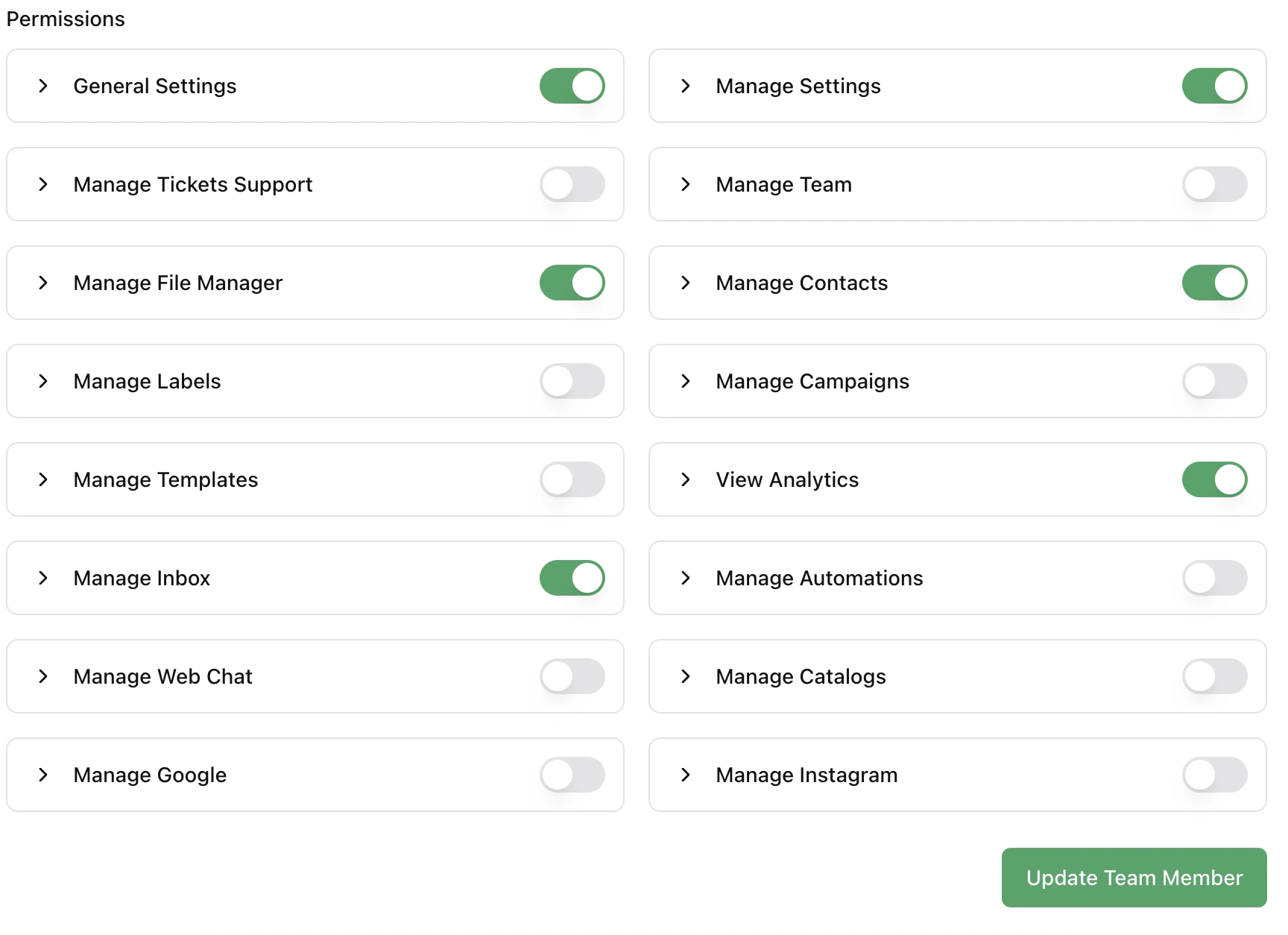
Permissions define what each team member can access and control.
### Available permission groups
* General Settings
* Manage Settings
* Manage Inbox
* Manage Contacts
* Manage Campaigns
* Manage Automations
* Manage Templates
* Manage Labels
* Manage File Manager
* Manage Web Chat
* Manage Google
* Manage Instagram
* Manage Catalogs
* Manage Team
* Manage Tickets Support
* View Analytics
Each permission can be enabled or disabled based on the role.
### Actions available
* Add member (based on plan limits)
* Edit user details
* Update permissions
* Remove access
> Member limits may depend on the subscription plan.
***
## Permissions
Permissions define what each team member can access and control.
### Available permission groups
* General Settings
* Manage Settings
* Manage Inbox
* Manage Contacts
* Manage Campaigns
* Manage Automations
* Manage Templates
* Manage Labels
* Manage File Manager
* Manage Web Chat
* Manage Google
* Manage Instagram
* Manage Catalogs
* Manage Team
* Manage Tickets Support
* View Analytics
Each permission can be enabled or disabled based on the role.
 ***
## How Permissions Work
* Permissions are assigned per user
* Each toggle controls access to a specific module
* Disabled permissions restrict visibility and actions
***
## Activity Logs
The Activity Logs tab tracks actions performed by team members.
### What it helps with
* Monitor user activity
* Track changes and updates
* Maintain accountability
***
## Recommended Workflow
1. Add team members based on roles
2. Assign only required permissions
3. Review permissions periodically
4. Monitor activity logs for usage and changes
***
## Best Practices
* Follow least-access principle (only give needed permissions)
* Avoid giving full access to all users
* Review inactive users regularly
* Keep ownership clear for critical workflows
***
## Related Docs
* [Inbox](/docs/inbox)
* [Channels](/docs/channels)
* [Analytics](/docs/analytics)
* [Automations](/docs/automations)
***
## How Permissions Work
* Permissions are assigned per user
* Each toggle controls access to a specific module
* Disabled permissions restrict visibility and actions
***
## Activity Logs
The Activity Logs tab tracks actions performed by team members.
### What it helps with
* Monitor user activity
* Track changes and updates
* Maintain accountability
***
## Recommended Workflow
1. Add team members based on roles
2. Assign only required permissions
3. Review permissions periodically
4. Monitor activity logs for usage and changes
***
## Best Practices
* Follow least-access principle (only give needed permissions)
* Avoid giving full access to all users
* Review inactive users regularly
* Keep ownership clear for critical workflows
***
## Related Docs
* [Inbox](/docs/inbox)
* [Channels](/docs/channels)
* [Analytics](/docs/analytics)
* [Automations](/docs/automations)