

What is this?
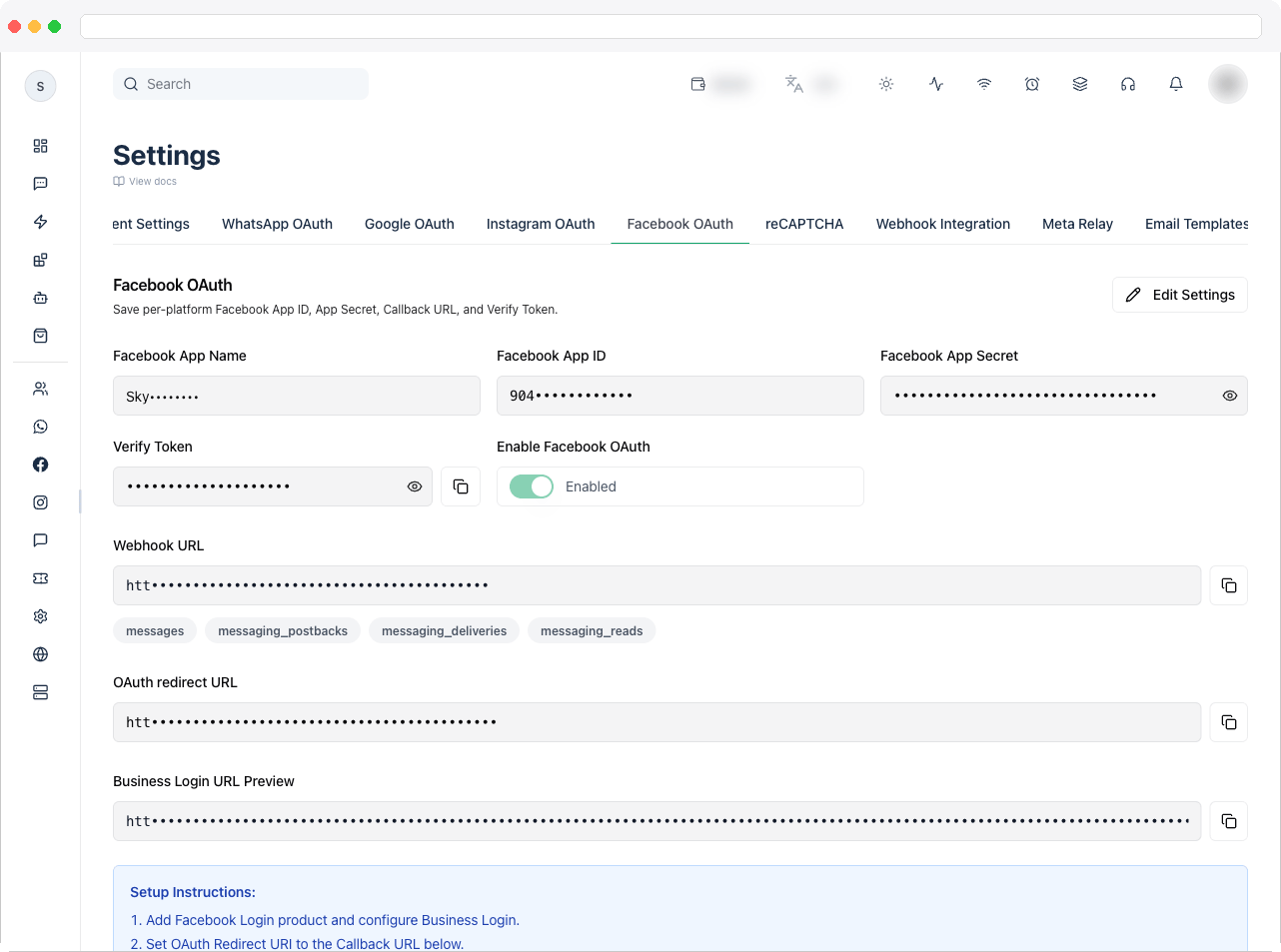
The Facebook OAuth tab connects your Meta (Facebook) app to the platform so workspace users can connect their own Facebook Pages for inbox, engagement, publishing, and automation. Many Messenger and Page workflows depend on a connected Page. Facebook OAuth is what lets the platform:- authenticate the business owner
- list and select available Facebook Pages
- subscribe Pages for webhook events
- enable Page-level messaging, comments, posts, and insights
Without approved Facebook permissions, Page connection and related inbox and automation features will not work in production. If Enable Facebook OAuth is off, channel connect and reconnect are blocked until it is turned back on.
What can I do here?
- Save your Facebook App Name, Facebook App ID, Facebook App Secret, and Verify Token
- Turn Enable Facebook OAuth on or off
- Copy the Webhook URL and OAuth redirect URL to paste into your Meta app
- Preview the Business Login URL
- Review the Required OAuth Scopes the platform requests
- Follow the built-in Setup Instructions
How to use it
Connect your Meta app
- In the Meta for Developers dashboard, add the Facebook Login product and configure Business Login.
- Set the OAuth Redirect URI in Meta to the OAuth redirect URL shown on this tab.
- Set the webhook callback URL in Meta to the Webhook URL shown on this tab, and use the same Verify Token when verifying it.
- On this tab, click Edit Settings and enter the Facebook App Name, App ID, App Secret, and Verify Token. All of App ID, App Secret, Callback URL, and Verify Token are required.
- Turn on Enable Facebook OAuth and click Save Settings.
- Go to Channels and click Connect Facebook Page to test the flow.
Required OAuth scopes
These are the scopes the platform requests when a user connects a Facebook Page:Submit for Meta App Review
Before your app can serve customers in production, Meta must approve the permissions above. Use the pack below to prepare your submission.1. App use-case description
1. App use-case description
Use this when Meta asks for a detailed description of how your app uses the permission or feature, how it adds value for a person using the app, and why it’s necessary.
Our platform is a customer communication and automation system used by businesses to manage Facebook Page interactions from a unified team inbox. Facebook OAuth is used so a business user can securely connect their own Facebook Page, authorize required permissions, and enable messaging, engagement, publishing, and insights workflows. Each requested permission maps to a visible feature in our product, such as selecting a Page, reading engagement and user content, managing comments, subscribing webhook events, sending replies, publishing posts, and viewing insights. These permissions are necessary for app functionality and are only used after explicit user consent.
2. Scope-by-scope justification
2. Scope-by-scope justification
pages_show_list — Required to display Facebook Pages the authenticated user manages, so they can select which Page to connect to our platform.pages_manage_metadata — Required to subscribe and maintain Page webhook metadata so message and engagement events are delivered reliably to our platform.pages_messaging — Required to send and receive Facebook Page messages through the platform inbox and automation rules.pages_read_engagement — Required to read Page engagement context (such as comments and interactions) used for inbox visibility, moderation, and engagement workflows.pages_read_user_content — Required to read user-generated content on the Page (for example comment text and related content) so agents and automations can respond accurately.pages_manage_engagement — Required to manage Page engagement actions such as moderating or responding to comments from the platform.pages_manage_posts — Required for businesses that use our platform to create, publish, or schedule Page posts and related workflows.read_insights — Required to retrieve Page insights so users can analyze performance and engagement inside the platform.business_management — Required to access business assets and complete account/page linkage securely during connection.public_profile — Required to display basic account identity for secure session and connection confirmation.
3. Screen recording checklist
3. Screen recording checklist
Meta may ask for a recording that proves each permission is used exactly as described.What to record
- Show your platform URL and sign in.
- Open Platform Settings → Facebook OAuth (or channel connection settings).
- Start the Facebook connection flow and show the OAuth consent screen.
- Select a Page and confirm the connection succeeded.
- Demonstrate a feature for each requested permission:
- page list selection (
pages_show_list) - a messaging action (
pages_messaging) - engagement or comment visibility (
pages_read_engagement,pages_read_user_content) - comment moderation or reply (
pages_manage_engagement) - event and webhook readiness (
pages_manage_metadata) - a publish action (
pages_manage_posts) - the insights screen (
read_insights)
- page list selection (
- Show the final connected state in your platform.
- Use one continuous recording (4–10 minutes is recommended).
- Include captions or voice-over explaining each permission’s usage.
- Mask secrets and personal information.
- Use the real production UI, not mock screens.
4. Upload instructions
4. Upload instructions
- Upload the video to Google Drive (Anyone with the link can view) or as an unlisted YouTube video.
- Open the Meta App Dashboard → App Review → Permissions and Features.
- Open each permission request and provide the permission description, reviewer test steps, the video link, and test account credentials if requested.
- Confirm your privacy policy URL, terms URL, and domain are live before you submit.
5. Pre-submission checklist
5. Pre-submission checklist
- Permissions requested in Meta exactly match the Required OAuth Scopes list above.
- The Page connection and webhook flow work before you submit for review.
- The video shows one real action per requested permission.
- Privacy policy, terms, and domain verification are complete.
- Reviewer steps and test credentials are included when required.
Troubleshooting / Technical Notes
- “Missing required fields.” App ID, App Secret, Callback URL, and Verify Token must all be filled in before saving.
- Connect Facebook Page is blocked. Enable Facebook OAuth is off — turn it on and save.
- Webhook verification fails in Meta. The Verify Token entered in Meta must match the one saved on this tab.
- Meta rejected the review. A mismatch between requested permissions and the recorded flow is a common cause. If a scope isn’t used in your current product flow, remove it before resubmitting.